Your iPhone battery is a crucial component that directly affects the device’s performance and longevity. Knowing when to replace your iPhone battery can save you from unnecessary frustrations and keep your phone running smoothly. This comprehensive guide will cover everything you need to know about iPhone battery replacement, from identifying signs of battery wear to understanding the replacement process.
To explore our iPhone repair services, visit our iPhone repair service page.
Understanding iPhone Battery Health
The health of your iPhone battery is a key factor in the overall performance of your device. Over time, batteries degrade due to regular use and exposure to various environmental factors. Understanding battery health can help you determine when it’s time for a replacement.
What is iPhone Battery Health?
iPhone battery health refers to the battery’s ability to hold a charge compared to when it was new. It is measured as a percentage, with 100% indicating a brand-new battery. As the battery ages, this percentage decreases, which can affect your phone’s performance and battery life.
Factors Affecting Battery Health
Several factors can influence the health of your iPhone battery, including:
- Charge Cycles: Each time you charge your iPhone from 0% to 100%, it completes one charge cycle. Batteries are designed to retain up to 80% of their original capacity after 500 complete charge cycles.
- Temperature: Extreme temperatures, both hot and cold, can negatively impact battery health. Avoid exposing your iPhone to temperatures above 35°C (95°F) or below 0°C (32°F).
- Usage Patterns: Heavy usage, such as gaming or streaming, can drain the battery faster and contribute to wear over time.
Signs It’s Time to Replace Your iPhone Battery
Recognizing the signs of a failing battery can help you avoid sudden phone shutdowns and other inconveniences. Here are some common indicators that it’s time to replace your iPhone battery:
Rapid Battery Drain
If your iPhone battery drains quickly, even with minimal use, it could be a sign that the battery is no longer holding a charge effectively.
Unexpected Shutdowns
Frequent unexpected shutdowns, especially when the battery is above 20%, are a clear indication that the battery is failing.
Slow Performance
A degraded battery can cause your iPhone to run slower than usual. If you notice lagging or slow app response times, it might be due to battery issues.
Battery Health Below 80%
Apple recommends replacing the battery when its health drops below 80%. You can check this in the Battery Health section of your iPhone settings.
Overheating
Excessive heat during charging or regular use can indicate that the battery is overworking or malfunctioning.
Explore our iPhone repair services at Univercell Canada to get your battery replaced professionally.
How to Check Your iPhone Battery Health
Apple provides a built-in feature to monitor your iPhone’s battery health. Here’s how you can check it:
- Open Settings: Tap on the Settings app on your iPhone.
- Select Battery: Scroll down and select the Battery option.
- Tap on Battery Health: Here, you will see your battery’s maximum capacity and peak performance capability.
Battery Health Metrics:
- Maximum Capacity: Indicates the current capacity of the battery relative to when it was new. A lower percentage means the battery is degrading.
- Peak Performance Capability: Shows if your battery can still support normal peak performance. If your battery’s health is significantly degraded, this section will indicate reduced performance.
The iPhone Battery Replacement Process
Replacing your iPhone battery can restore its performance and extend its lifespan. Here’s an overview of the replacement process:
Professional Replacement
- Assessment: A technician will assess your iPhone’s battery health and confirm the need for replacement.
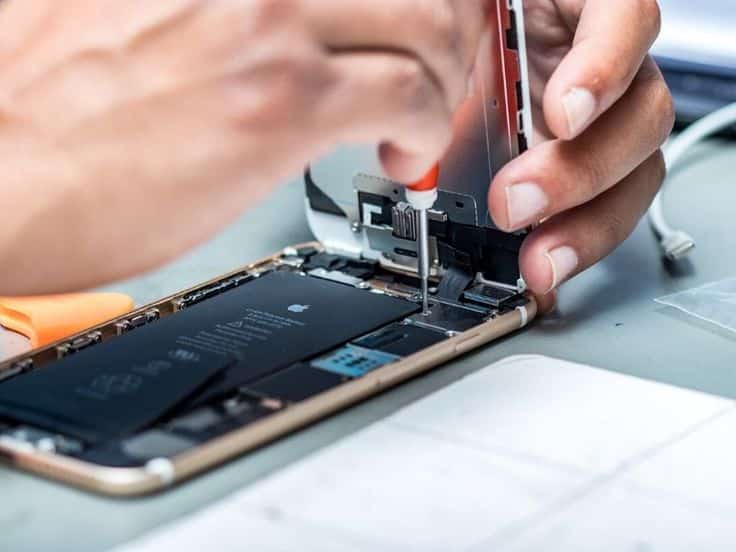
- Disassembly: The technician will carefully disassemble your iPhone to access the battery.
- Battery Replacement: The old battery is removed, and a new one is installed.
- Reassembly: The iPhone is reassembled, and the technician performs tests to ensure everything is working correctly.
DIY Replacement
While it’s possible to replace the battery yourself, it requires technical skills and the right tools. DIY replacement can void your warranty and potentially damage your device if not done correctly.
Advantages of Professional Replacement
- Expertise: Trained technicians have the expertise to perform the replacement safely and efficiently.
- Quality Parts: Professionals use high-quality, compatible batteries.
- Warranty: Professional services often provide a warranty on the replacement battery.
Can You Replace Your iPhone Battery Yourself?
Replacing your iPhone battery yourself is possible but comes with risks. Here are some considerations:
Pros
- Cost Savings: DIY replacement can be cheaper than professional services.
- Convenience: You can replace the battery at your convenience without scheduling an appointment.
Cons
- Risk of Damage: Incorrect disassembly or installation can damage your iPhone.
- Warranty Void: DIY replacement can void any existing warranties on your device.
- Quality of Parts: It can be challenging to find high-quality replacement batteries.
Benefits of Professional iPhone Battery Replacement
Opting for a professional iPhone battery replacement offers several benefits:
Reliability
Professional technicians have the skills and experience to replace your battery reliably, ensuring your phone functions optimally.
Safety
Professionals follow safety protocols to prevent damage to your device and ensure safe disposal of the old battery.
Warranty
Many professional services offer warranties on their work and the replacement battery, providing peace of mind.
Preventing Battery Wear and Tear
Taking care of your iPhone battery can extend its lifespan and maintain its performance. Here are some tips to prevent battery wear and tear:
Avoid Extreme Temperatures
Keep your iPhone away from extreme temperatures to prevent damage to the battery. Avoid leaving your phone in hot cars or exposing it to freezing temperatures.
Use Official Chargers
Use Apple-certified chargers and cables to charge your iPhone. Third-party chargers can cause damage and affect battery health.
Enable Low Power Mode
When your battery is running low, enable Low Power Mode to reduce power consumption and extend battery life.
Update Software Regularly
Keep your iPhone’s software up to date. Apple regularly releases updates that optimize battery performance and fix bugs.
Avoid Full Discharges
Try to keep your battery level between 20% and 80%. Avoid letting your battery drain completely before recharging.
Frequently Asked Questions
When should I replace my iPhone battery?
Replace your iPhone battery when its health drops below 80%, if it drains quickly, or if you experience unexpected shutdowns and performance issues.
Can I replace my iPhone battery myself?
While it's possible, DIY replacement carries risks such as damaging your device or voiding warranties. Professional replacement is recommended for safety and reliability.
How long does an iPhone battery replacement take?
Professional battery replacement typically takes about 30 minutes to an hour, depending on the service provider and model of your iPhone.
How much does it cost to replace an iPhone battery?
The cost varies depending on the model and service provider. Professional replacement usually ranges from $50 to $100.
Will replacing the battery delete my data?
No, replacing the battery does not delete your data. However, it's always a good practice to back up your data before any repair.
Conclusion
Replacing your iPhone battery when necessary is crucial for maintaining optimal performance and extending the lifespan of your device. Recognizing the signs of a failing battery, understanding the replacement process, and knowing how to care for your battery can help you avoid disruptions and enjoy a seamless iPhone experience.
For professional iPhone battery replacement services, visit Univercell Canada.